Output
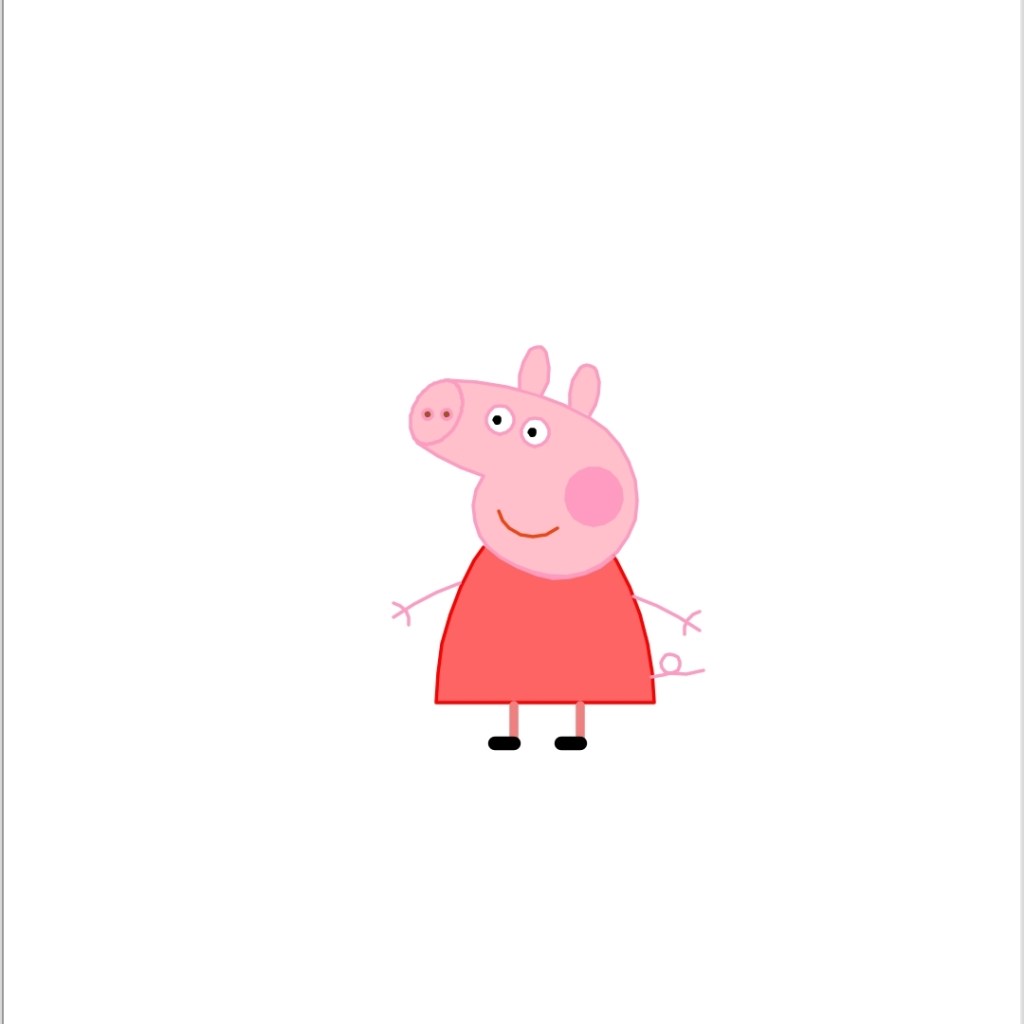
Source Code
import turtle as t
t.pensize(4)
t.hideturtle()
t.colormode(255)
t.color((255,155,192),”pink”)
t.setup(840,500)
t.speed(10)
t.pu()
t.goto(-100,100)
t.pd()
t.seth(-30)
t.begin_fill()
a=0.4
for i in range(120):
if 0<=i<30 or 60<=i<90:
a=a+0.08
t.lt(3)
t.fd(a)
else:
a=a-0.08
t.lt(3)
t.fd(a)
t.end_fill()
t.pu()
t.seth(90)
t.fd(25)
t.seth(0)
t.fd(10)
t.pd()
t.pencolor(255,155,192)
t.seth(10)
t.begin_fill()
t.circle(5)
t.color(160,82,45)
t.end_fill()
t.pu()
t.seth(0)
t.fd(20)
t.pd()
t.pencolor(255,155,192)
t.seth(10)
t.begin_fill()
t.circle(5)
t.color(160,82,45)
t.end_fill()
t.color((255,155,192),”pink”)
t.pu()
t.seth(90)
t.fd(41)
t.seth(0)
t.fd(0)
t.pd()
t.begin_fill()
t.seth(180)
t.circle(300,-30)
t.circle(100,-60)
t.circle(80,-100)
t.circle(150,-20)
t.circle(60,-95)
t.seth(161)
t.circle(-300,15)
t.pu()
t.goto(-100,100)
t.pd()
t.seth(-30)
a=0.4
for i in range(60):
if 0<=i<30 or 60<=i<90:
a=a+0.08
t.lt(3)
t.fd(a)
else:
a=a-0.08
t.lt(3)
t.fd(a)
t.end_fill()
t.color((255,155,192),”pink”)
t.pu()
t.seth(90)
t.fd(-7)
t.seth(0)
t.fd(70)
t.pd()
t.begin_fill()
t.seth(100)
t.circle(-50,50)
t.circle(-10,120)
t.circle(-50,54)
t.end_fill()
t.pu()
t.seth(90)
t.fd(-12)
t.seth(0)
t.fd(30)
t.pd()
t.begin_fill()
t.seth(100)
t.circle(-50,50)
t.circle(-10,120)
t.circle(-50,56)
t.end_fill()
t.color((255,155,192),”white”)
t.pu()
t.seth(90)
t.fd(-20)
t.seth(0)
t.fd(-95)
t.pd()
t.begin_fill()
t.circle(15)
t.end_fill()
t.color(“black”)
t.pu()
t.seth(90)
t.fd(12)
t.seth(0)
t.fd(-3)
t.pd()
t.begin_fill()
t.circle(3)
t.end_fill()
t.color((255,155,192),”white”)
t.pu()
t.seth(90)
t.fd(-25)
t.seth(0)
t.fd(40)
t.pd()
t.begin_fill()
t.circle(15)
t.end_fill()
t.color(“black”)
t.pu()
t.seth(90)
t.fd(12)
t.seth(0)
t.fd(-3)
t.pd()
t.begin_fill()
t.circle(3)
t.end_fill()
t.color((255,155,192))
t.pu()
t.seth(90)
t.fd(-95)
t.seth(0)
t.fd(65)
t.pd()
t.begin_fill()
t.circle(30)
t.end_fill()
t.color(239,69,19)
t.pu()
t.seth(90)
t.fd(15)
t.seth(0)
t.fd(-100)
t.pd()
t.seth(-80)
t.circle(30,40)
t.circle(40,80)
t.color(“red”,(255,99,71))
t.pu()
t.seth(90)
t.fd(-20)
t.seth(0)
t.fd(-78)
t.pd()
t.begin_fill()
t.seth(-130)
t.circle(100,10)
t.circle(300,30)
t.seth(0)
t.fd(230)
t.seth(90)
t.circle(300,30)
t.circle(100,3)
t.color((255,155,192),(255,100,100))
t.seth(-135)
t.circle(-80,63)
t.circle(-150,24)
t.end_fill()
t.color((255,155,192))
t.pu()
t.seth(90)
t.fd(-40)
t.seth(0)
t.fd(-27)
t.pd()
t.seth(-160)
t.circle(300,15)
t.pu()
t.seth(90)
t.fd(15)
t.seth(0)
t.fd(0)
t.pd()
t.seth(-10)
t.circle(-20,90)
t.pu()
t.seth(90)
t.fd(30)
t.seth(0)
t.fd(237)
t.pd()
t.seth(-20)
t.circle(-300,15)
t.pu()
t.seth(90)
t.fd(20)
t.seth(0)
t.fd(0)
t.pd()
t.seth(-170)
t.circle(20,90)
t.pensize(10)
t.color((240,128,128))
t.pu()
t.seth(90)
t.fd(-75)
t.seth(0)
t.fd(-180)
t.pd()
t.seth(-90)
t.fd(40)
t.seth(-180)
t.color(“black”)
t.pensize(15)
t.fd(20)
t.pensize(10)
t.color((240,128,128))
t.pu()
t.seth(90)
t.fd(40)
t.seth(0)
t.fd(90)
t.pd()
t.seth(-90)
t.fd(40)
t.seth(-180)
t.color(“black”)
t.pensize(15)
t.fd(20)
t.pensize(4)
t.color((255,155,192))
t.pu()
t.seth(90)
t.fd(70)
t.seth(0)
t.fd(95)
t.pd()
t.seth(0)
t.circle(70,20)
t.circle(10,330)
t.circle(70,30)
t.done()
Code Description
This code uses the turtle library to draw a picture on the screen. The turtle object is controlled using functions such as “forward”, “backward”, “left”, “right”, etc. The code sets the pen size, color, and position of the turtle and then repeatedly moves the turtle and fills in shapes to build up the picture. The final result is a stylized representation of a smiling face.
 Shark
Shark 